
The series finale

As the academic year reaches its end, what better time to deliver the final blog post in what’s been a thoroughly enjoyable series. Much like my blogging experience, the academic year has been a memorable one. I feel like I’ve grown as both a person and student over the last 7 months, and I’m much better off for having chosen to do a masters programme. With that in mind I’ve decided it would be best to reflect back on the whole experience, and pick what I believe are the biggest things I’ve learned. Below is a list of the three most important things I’ve learned on the course.

  1. Theories and Models

Over the course of the year, I’ve been lucky enough to be taught all about the theoretical aspect of technical communication and e-learning. While I undoubtedly prefer hands on practical work, I’ve come to appreciate the importance of having theoretical knowledge. Without theory the practical side of my work would struggle, so it’s crucial that I’ve been able to gain knowledge of the most important theories and models. When I look back throughout the year, I’ve been able to apply the theoretical knowledge gained in lectures to real life practical assignments. The main theories that spring to mind are the ones learned in the instructional design classes. The theories of Robert Gagne for example are ones that I will use for the rest of my life if I end up working in instructional design or e-learning. Learning about theories such as the 5-component guide to writing performance objectives, benefited me in a range of modules and not just the instructional design ones. It’s safe to say that I’ll be keeping all my lecture slides in a safe place! Most of the content in these slides will be the building blocks for any courses I design in the future.

  1. Software and Tools

Learning to use different software and tools has been a common feature of the master’s programme. In my undergrad I was exposed to a very limited range of software and tools. As a result of this the only programs I felt I could actually use properly were Microsoft Word and Powerpoint!! As you can imagine these aren’t going to be very beneficial when looking for a job. This time round though I’ve been pleasantly surprised. I’ve been able to gain first-hand experience in using software and tools that are actually used by technical communicators and e-learning developers. I’ve been able to use these tools to complete a number of projects which helps me see how they are used in real life. Tools such as photoshop have allowed me to improve any graphics I work on and make a difference to my projects. Other valuable software packages include the likes of Adobe Dreamweaver and Storyline. When looking at job openings online it’s usually expected that applicants have experience in using such software. Again, I feel I am much better prepared to get a job now as a result of this experience.

  1. Professional expectations

Perhaps the biggest thing I’ve learned all year is what will be expected of me as a professional. One of the major strengths of my course is that the lecturers place emphasis on getting you prepared for the real world. It’s all well and good sitting in a lecture and listening to someone speak, but you need to have experience of doing work that will be relevant in the future. Thankfully I feel like I am very well prepared in this regard. Even down to aspects such as time management, I feel like I know what to expect when I’m starting a new job. I’ve often struggled with my time management in the past, but having to constantly juggle a number of assignments at once has forced me to take ownership of my planning. I’ve also been able to see what sort of standards my work will have to adhere to if I want to have any hope of being successful. I’ve been able to learn from a range of professionals through the many guest lectures we’ve had this year. Hearing from people who excel in their fields has opened my eyes to what will be expected of me if I work in a similar role.

Although I only listed 3 aspects in this blog it’s important to note that I have learned tonnes more than this. I simply had to pick 3 because the list would go on forever otherwise. I think that in itself speaks volumes for how much I’ve learned this year. To anyone thinking of pursuing a career in technical communication and e-learning, I’d urge them to consider looking at the masters programme in The University of Limerick!
Wix

Wix is a free online application that allows users to create their own website and mobile sites. Wix is recognised as one of the leading applications when it comes to free website design. It’s simple to use interface and large database of templates makes it suitable for those with the most basic tech skills. It uses a “what you see is what you get” model which means users don’t need to have knowledge of code or markup languages. However, people who have such knowledge will be able to make use of it if they want. For example, users can engage in HTML scripting through the app’s graphical user interface. The key features of WIX are listed below:

  • Customizable designs
  • Designer-made templates
  • Multi-platform support
  • Drag and drop editor
  • Free domain hosting

This semester I’ve had the chance to try out Wix for myself. Currently I’m designing an e-portfolio that will showcase the skills and different projects I’ve completed. By the end of it I’ll have a comprehensive resource that I can use to show future employers. As I’ve already designed an e-portfolio using WIX I decided I would try my hand at it again. I had a very pleasant experience using it last year, so it makes sense to use it again. I can also look back on that experience to see what changes or improvements I will need to make this time around. One thing that springs to mind is to focus equally on the content and design of the resource. Last year I think I focused far too much on the design of the website. I became obsessed with creating an aesthetically pleasing site and failed to dedicate as much time to designing the actual content of the site. I will need to create four artifacts that showcase the skills I’ve learned this year. While the appearance of the website is undoubtedly important, employers will be paying closer attention to the artifacts to see what sort of projects I’ve completed. I also think I’m in much better shape now to design a website due to the knowledge I’ve gained on usability. Last year when designing the website, I had no knowledge of what usability was. I designed the site for myself instead of taking into account the target audience. This time around I’ll be able to ensure the site is usable and accessible to everyone. Also, for anyone looking to create their own website on WIX I urge you to check out the video below!

Finally putting theory into practice

As I near the end of my masters experience, it’s time to knuckle down one final time and get over the finish line. I’ve learned a lot over the course of the year and I definitely feel like I’ve been justified in choosing the right course. One of the last hurdles to cross is that of the e-learning course design assignment. In this assignment I will have to create my own e-learning course from scratch. It gives me the chance to put all my newly acquired knowledge to the test, and to see if I can transfer this knowledge to a real life project.

When hearing about the assignment I was a bit daunted to say the least. I wasn’t expecting the scope of the project to be so big. Designing a whole e-learning course is no mean feat and it takes a lot of knowledge and skill to do so. However I can say safely that I feel like I have all the necessary knowledge required to complete a project like this. In many ways I feel like it’s the perfect assignment to cap off a memorable year. The assignment will allow me to see what it’s like to work as an e-learning developer or instructional designer who has to work to a deadline and project brief. At the end of it I’ll also have a real life example of a completed project that I can show to employers as part of a portfolio. Finished examples such as this can be the difference in either getting a job or not. A long with this I’ll also be able to draw on things I’ve learned in a number of modules and these can be blended together to create the final product. I feel i’ts a great way to solidify what I’ve learned all year before I go out into the job market.

It’s therefore safe to say that this assignment is one that I’m looking forward to. As the year has drawn on I’ve come to enjoy the e-learning side of the course. A positive experience in this assignment could finally help me decide what route I want to go down.

Becoming a master of XML

As part of my assessment for a college module I’ve been tasked with creating an XML document. For those of you that don’t know XML is one of the lesser used markup languages in website design. As someone who does not come from a computer background this assignment should prove tricky. Over the course of my 5 years in college I’ve had very little exposure to markup languages used in web development. When I was in 4th year I was able to participate in some labs that showed us the basics of HTML and CSS. In truth I found it difficult to understand what was going on in these labs. Seeing such complicated data was a shock to the system! I had always assumed that such technical content was only meant for students studying computer science. It’s no surprise then that I found it difficult to take anything away from these labs as my natural instinct was to panic over how I’ll never be able to understand the content.

Upon hearing that I would have to learn yet another markup language this semester, my reaction was much of the same. I had just started to try and wrap my head around our HTML and CSS labsheets, and now I would have to add another one to the list. However, when researching about CSS and HTML I discovered a youtube account that provided really handy tutorials in both markup languages. I had found him very easy to understand and he helped me to learn the most basic aspects of both languages. It just so happened that the third installment of his tutorial series would deal with XML!! When the assignment brief came out last week I went straight to youtube and watched the third tutorial. Having already looked at CSS and HTML I found it a lot easier than I expected to follow the lesson. I now understand the purpose of using XML and I have a basic knowledge of how it works.

Despite my initial shock when seeing the assignment brief I feel like I’m in a good place to design a good quality XML document. It’s going to take a lot of playing around before I can finalize my document but this is only normal. Over the next week or so I will review the labsheets provided to us and hope that I’m completely up to speed by then. All going well I’ll be confident when designing the final product.

Reflecting on my blogging experience

With all that’s going in the world right now I’ve had plenty of time to reflect. Taking a back step from the craziness of my old routine has allowed me to evaluate different aspects of my life. Therefore I figured this would be the perfect time to reflect on my blogging experience so far.

At the start of the semester I was tasked with maintaining this blog for 10 weeks. I’m not afraid to admit that I was unhappy about the whole idea of blogging. Over the years I’ve had plenty of experience blogging for college modules, and I didn’t enjoy any of them. I had always thought blogging was a waste of time and something done by people who lack hobbies. I’ve always been a private person who doesn’t like to share details of my life with others, especially not on the internet for the world to see.

However when setting up this blog at the start of the year I vowed to dedicate more time to the art of blogging. I knew I had failed to buy into the previous blogs so this time would have to be different. From the get go I decided that I would plan all my blogs at the start of the week. I would then be able to write the blog posts whenever I had free time and this process has worked well for me thus far. I’ve mad more of an effort to read other blogs which has helped improve my writing style as well as coming up with new ideas. This was something I failed to do when writing my older blogs. Perhaps the best thing I’ve decided to do was to simply change my attitude. In the past I dreaded writing my blog posts and kept putting off the writing of them. This always led to me having a backlog of work to get through in a short space of time. Now I look forward to writing my blog posts each week as they give me a chance to reflect on my coursework. Doing so has allowed me to spot any issues before they snowball, generally improving my work all round.

To finish up I’d like to take this chance to encourage anyone reading to create their own blog. The positives far outweigh the negatives and you can make genuine improvements to your life.

Adapting to online learning

As I’m sure your’e all aware, universities throughout the world are closing their campuses due to the Coronavirus. Thankfully though most of these universities have been able to make adjustments so that their students can continue with their coursework. In most cases this means that the traditional face to face teaching methods have been substituted with online learning. Lecture slides are being put online for students to access and classes are being video recorded. And while this is undoubtedly a positive move it still poses a number of challenges.

I for one, have found the move to online learning difficult. While my course is delivered both online and on campus as it is, I have always chosen the on campus method of learning. Being on campus means I can attend classes and ask questions if need be. Although I have access to podcasts of my classes, I think it’s easier to learn when I’m there in person. Face to face classes are more interactive than accessing a pre-recorded lecture and there’s no way around it (In my opinion). And although I hate to admit it I find it hard to motivate myself to sit through a recorded lecture. It just doesn’t feel the same.

Perhaps the biggest challenge in all of this campus closure is the fact that I’ve lost access to the library. With the library shut down I’ve been forced to study at home. As someone who hasn’t done a single day of study at home in over 4 years I’m finding it challenging. I live in a small house in a noisy housing estate so it’s difficult to block out the distractions. I had been used to my routine of spending the majority of my day in the library but now that’s been taken away from me. And although I’m far from happy about it, there are more important things at stake now. I’m not the only one in this position so I can take some solace in that. The next few weeks will definitely be challenging as I adjust to this new style of learning. However I intend to use it wisely and will be exploring new e-learning technologies that can make my life easier. It’s important to look on the bright side of life so that’s exactly what I intend to do!

User Assistance

Last week I was lucky enough to be able to take part in an online lecture given to my class by a software company. The company in question is SAP and they are a major employer of graduates from the course I am in. They require workers with a background in technical communication due to the fact that they need documents to compliment their software packages. One of the main occupations described to us by the speakers was the role of a User Assistance developer.

Before this talk I had never heard of the term User Assistance. In truth I had very limited knowledge of the work that SAP do. I’d always envisaged that I would work as a technical writer, Information or instructional designer or an e-learning developer. Outside of these jobs I never really thought that there are a whole host of other jobs available to me. Therefore I was naturally curious to hear all about the role of a user assistance developer!Learning about a new career path could prove invaluable when I’m seeking a job.

The role of a user assistance developer focuses on the delivery of technical documentation for software applications. The speakers informed us that the user assistance developers in SAP create documentation that helps users install and set up SAP software. They also create in app help, interactive graphics and videos to help users. Another interesting development that User Assistance developers work on are chatbots. Chatbots are like a digital assistant that anticipates questions a user might ask.

I also got to learn about the key skills that SAP look for in a potential employee. A good user assistance developer should have a good eye for detail, a passion for quality and good writing abilities to name but a few. At the end of the talk I got to learn about the role of an editor and how they work hand in hand with the user assistance developers. It was nice to be able to get an idea of the interactions between different roles and to get an idea about their collaboration.

In hindsight I’m delighted I was able to get such an insight into a company that hires people like me. I’ve learned about roles I never knew were suited to me and what’s needed to attain them. Hearing from people who have forged successful careers for themselves in technical communication provides me with ample motivation to finish the semester strongly. With a bit more consistency and hard work I can hopefully find my own place in the industry.

Audacity

Audacity is a free online digital audio editor and recorder used to create podcasts. It can be downloaded Windows, macOS and Linux operating systems. Some of Audacity’s key features include:

  • Recording and playing back sounds
  • Audio editing
  • Cross platform operation
  • Multi-track mixing
  • Importing and exporting of audio files

Last semester I had the opportunity to use Audacity and see was the hype justified. The reasoning behind me using Audacity was that I had to create an instructional podcast for a college module. I decided to create a podcast that would educate listeners on concussion in sport. I had an abundance of personal experiences with concussion so I felt my podcast was badly needed. When hearing for the first time that I would be creating a podcast, I wasn’t at all worried about it. I thought it would be relatively straightforward and that the theory behind designing it would be the only challenging aspect. While designing the podcast based on instructional design theories was challenging, the podcasting element proved tougher than expected. I had envisaged that I would be able to use my phone to record the podcast. The next step would then be to upload the podcast to audacity and job done! I’m not ashamed to say I was wrong though. Initially I recorded the podcast on my phone, but the results were not satisfactory. The sound quality was quite rough around the edges and the volume wasn’t loud enough. After much reluctance I then decided to buy a microphone to record the podcast. And while the microphone did improve the sound quality slightly, it was still fairly poor. After trying multiple times to get a clear recording I gave up. The microphone was not capable of recording quality audio so I just decided I’d have to make do with the best recording out of a bad bunch. This is where Audacity would come into play. I had watched a number of tutorials on Youtube about how to get the best out of Audacity. I began working on the recording and tried to improve the sound quality ever so slightly. With the help of effects like the equalizer I was able to balance the sound and stop the random jumps in volume. I was also able to remove any background noises that I didn’t want such as a door closing. This was made possible with the noise removal tool. And while these tools did take plenty of playing around with, they were relatively easy to use. In the end I was left with an improved version of the initial recording, although it was still worse than I wanted it to be. One thing is for sure though, had it not been for the highly usable nature of audacity, it would have been a whole lot worse! 

Upon reflection I’m very satisfied with my experience of using Audacity. It’s very easy to use and there a loads of helpful tutorials available online. If I was to do the whole podcast assignment again I’d invest in a better microphone. In terms of Audacity however I don’t think I’d change a whole lot. Audacity is regarded as the leader in its field for a reason, and I can certainly vouch for that. I should also direct your attention to the youtube tutorial below. It made my experience with Audacity a positive one when it could have been negative!

Legal Copyright

Legal copyright is a term that I have rarely heard throughout my life. Whenever I have heard it however I’ve merely brushed it aside because I thought it had no relevance to me. To me it just sounded like some legal jargon that should only be known by lawyers or those studying law at college.

However I was able to learn all about legal copyright last week in a college lecture. To my surprise I learned that technical communicators need to be aware of certain legal matters that could be important for their career. Elements of copyright sch as patents are extremely important to know about. For instance if I ever decide to create an online application I might need to patent it to ensure that nobody else can make money from it. As someone who could well end up going to work as an information designer, I could be involved in the creation of online applications. Learning about all the intricacies of copyright laws has made me realise how little I really know about the subject. I always had it in my head that creating an application was something a person could do on their own. I like the idea of being innovative and thinking of gaps in the market where a new application could be useful. However I’m really going to have to wait quite a while before I can think about ideas. The average cost for a patent is 32,000 euros so I’m completely out of the price range. I guess I’m just going to have to be patient and wait until I have some financial backing before I can think about a career in app development. This lecture was probably a blessing in disguise as its really made me look at my future prospects more realistically. While I still dream of making money from a new application, I’ll push it to the back of my mind instead of the front!!

Adobe Animate

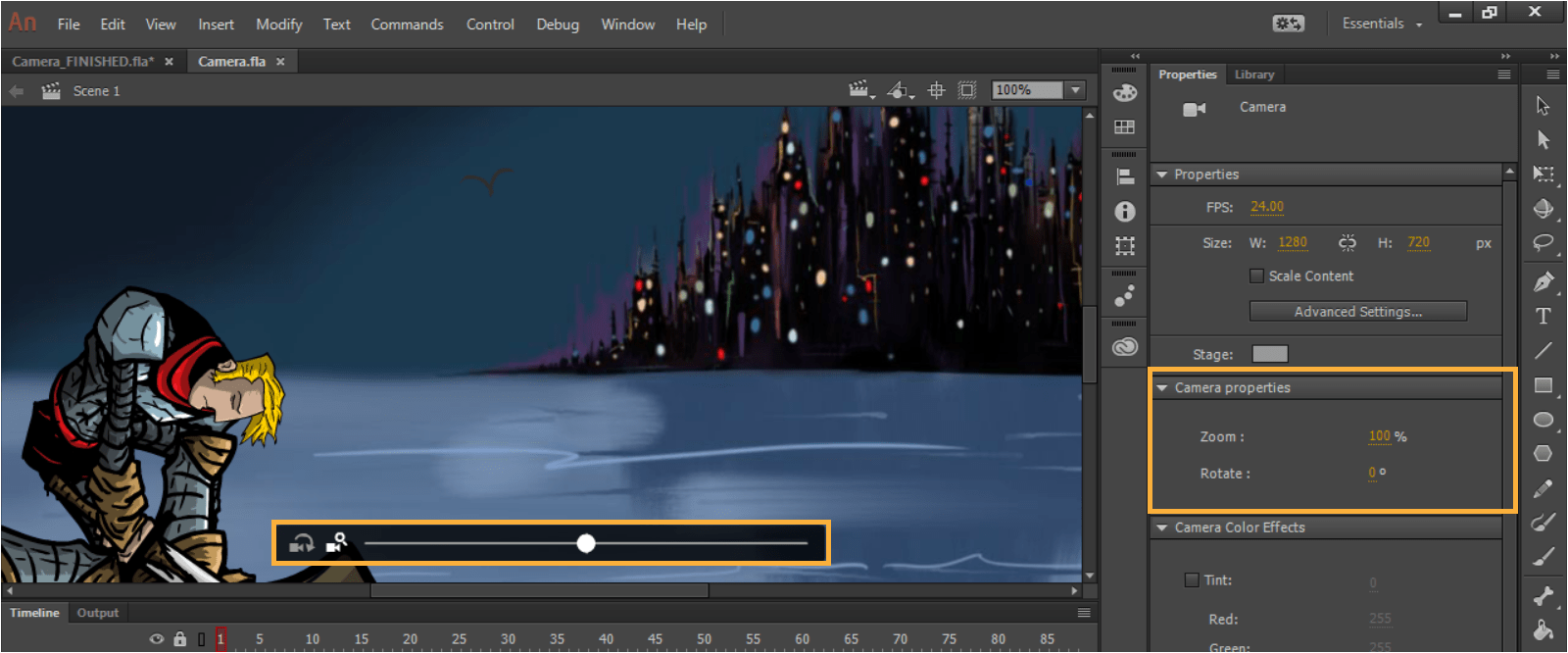
Adobe Animate is a computer program used to create animations. Animate is most commonly used to create animations for television programs, websites, video games and applications. These animations can be published for HTML5, WebGL and Flash player to name but a few. Adobe Flash used to be the main program for creating animations but it underwent a name change in 2016 where it became known as Animate.

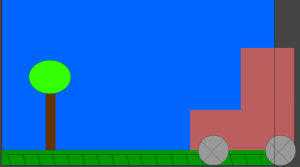
 Interestingly, I had the chance to try out this piece of software for myself last week. For my interactive courseware module in college I’ve been tasked with creating a digital learning resource. I’ve opted to create an online e-learning course to help DJ’s configure their music equipment. In order to make this digital resource more functional it will require some incorporation of animations. We were therefore given a workshop in how to use Adobe Animate so we could create the best digital resource possible. Although I wasn’t able to attend the workshop myself, the lab sheets were posted online so I could try them out in my spare time. In the lab sheets I learned about some of the benefits of using Adobe Animate and some of it’s key features. I was provided with instructions on how to manipulate layers, and import images and animated movies. I also learned how to create a very basic animation of a train driving on train tracks. To do so I was able to draw on the screen to create what was essentially a 2D painting. I was able to use shapes to create things like trees and the train itself. I made use of keyframes in order to rotate the wheels on the train. When animated these wheels started moving. Subsequently I was able to drag the train across the screen while the wheels were moving to essentially create an animation. Although I was able to complete the labsheet with relative ease I’m unsure if id be able to make my own animations without such instructions. It’s going to take plenty of getting used to but I hope youtube will have some useful tutorials. Being able to create my own animations will allow my digital resource to appear more professional and will add to the learning experience. Below is a screenshot of the simple animation I created!!

reflective Learning Blog

A Reflective Approach to Learning Experiences

Ryan Lanz

Fantasy Author

College Life

A Lot More Than Just Studying

TWO WRITING TEACHERS

A meeting place for a world of reflective writers.

ethanknewmedia

Writing for New Media

The Daily Post

The Art and Craft of Blogging

WordPress.com News

The latest news on WordPress.com and the WordPress community.

reflective Learning Blog

A Reflective Approach to Learning Experiences

Ryan Lanz

Fantasy Author

College Life

A Lot More Than Just Studying

TWO WRITING TEACHERS

A meeting place for a world of reflective writers.

ethanknewmedia

Writing for New Media

The Daily Post

The Art and Craft of Blogging

WordPress.com News

The latest news on WordPress.com and the WordPress community.

Design a site like this with WordPress.com
Get started